Giben America website
A US rebrand and Squarespace site for an industrial machinery brand, connected to its service, parts and knowledge base, with ongoing monthly support.
Services

01 The work
See it liveChallenge
Giben has built panel saws and edgebanders for decades, but in North America it needed to read as a local brand with real support behind it. Sales, service and parts each sent customers to different places.
The site had to sell machines, answer support questions and stay easy for the team to manage.
Approach
We started with the brand, then built the site on Squarespace 7.1 so the team could make everyday changes on their own.
- Refreshed the brand for the US market.
- Organized the machines into a clear catalog by type.
- Gave support its own hub, so customers find service, parts and how-to answers in one place.
What I built
Brand book
We rebranded Giben for the US market, then designed and built the site. This is the design system, read from the live site.
Cover
Eight pages that record the design system we created for the Giben America website.

Color
A near-black ground makes the white machines stand out. One bright blue marks every button, label and link, and green means in stock. Palette: #007BFF #4A9EFF #FFFFFF #00C853 #F59E0B #060608 #0D0D11 #0B1628

Typography
Space Grotesk for headlines, machine names and numbers. Inter for body copy, labels and buttons. Nunito Sans in the top navigation.

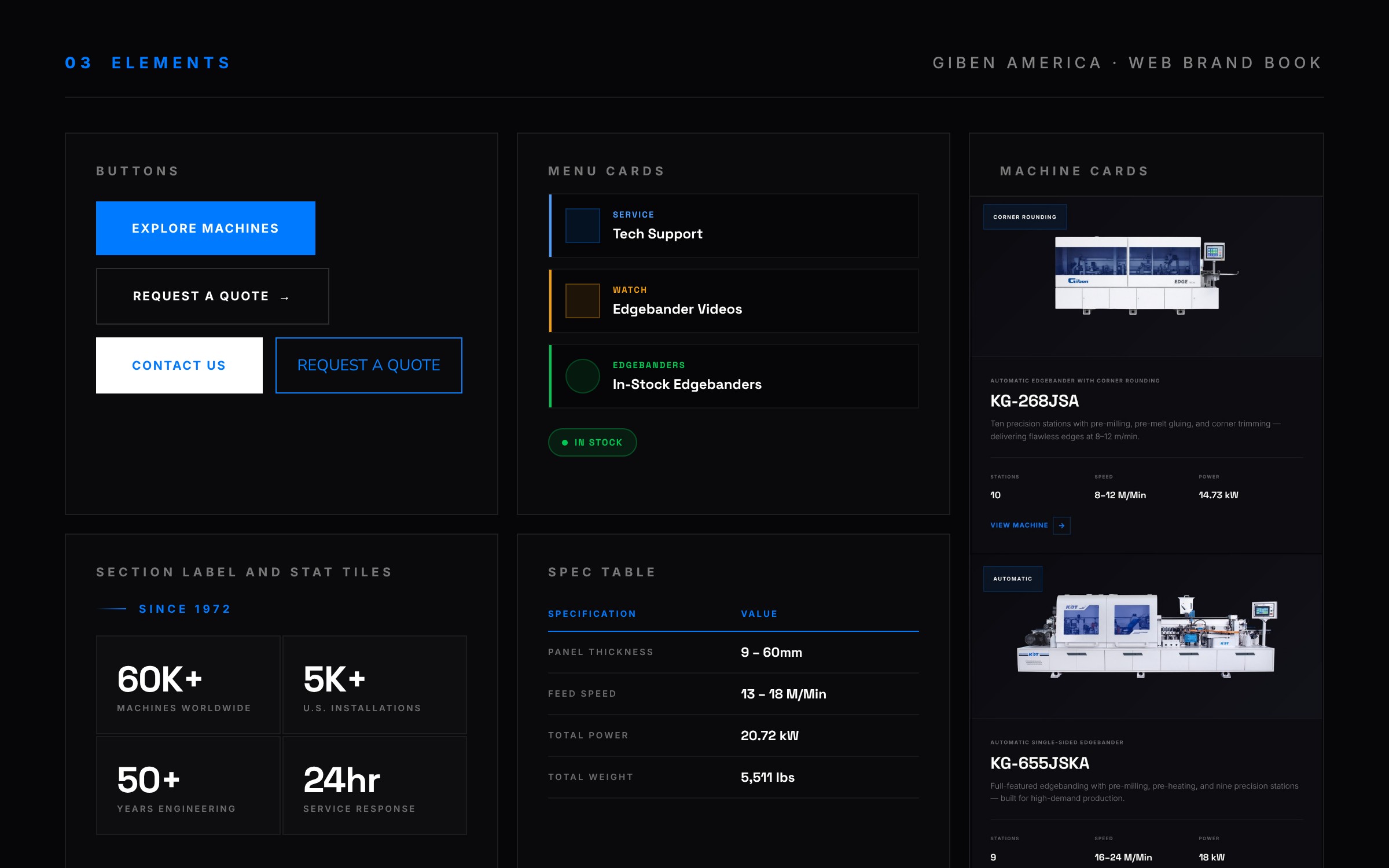
Elements
Square corners and hairline borders. Solid blue buttons, small wide-spaced labels, stat tiles, spec tables and menu cards with a colored edge.
Art direction
The machine is the hero. White machines on a dark floor, a blue glow from the header, and a big headline with one word in blue.

Pages
The same system runs from the homepage to a machine page, the support hub and the in-stock page.

Navigation
Two large menus. Machinery shows all eight machines with a photo. Support groups help, video training and direct contact.

Mobile
On a phone the menu opens full screen, with Request a Quote one tap away.

The pages
Four pages from the live site, top to bottom.
Home
A full-screen hero, three support shortcuts, company numbers, the machine catalog and the in-stock program.

Machine page
KG-706: a photo gallery, a spec table, the nine stations, key components and a sales sheet download.

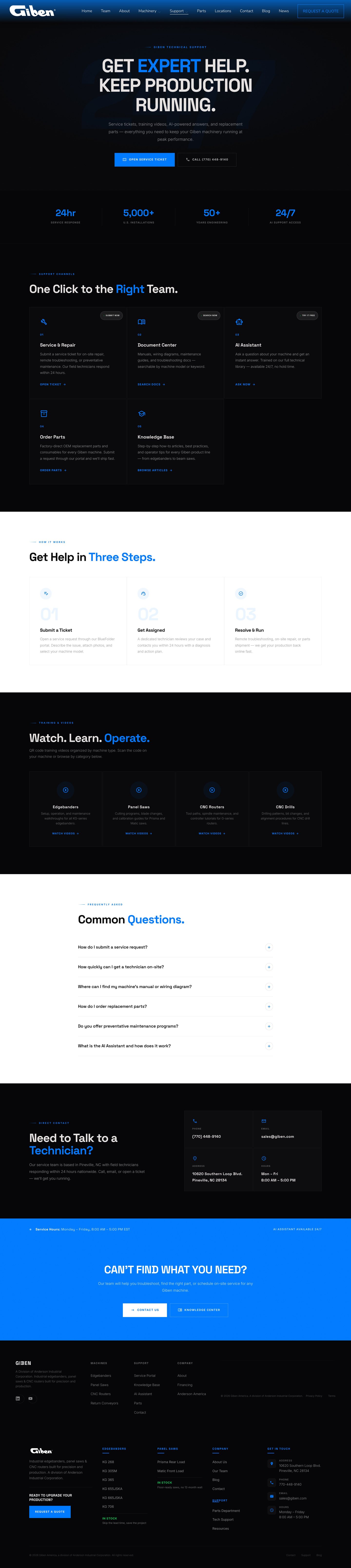
Support hub
Five support channels, a three-step guide, four video training libraries and six common questions.
In stock
Five in-stock edgebanders, each with a photo, four key specs and a quote button.

Functionality
- A machine catalog of 6 edgebanders and 2 panel saws, each with its own page.
- Machine pages with a photo gallery, a spec table, a station-by-station breakdown and a sales sheet download.
- Lineup pages that compare the edgebanders and the panel saws side by side in a spec table.
- An in-stock section listing 5 edgebanders and 3 beam saws that are ready to ship.
- A support hub with 5 channels: service tickets, the document center, an AI assistant, parts orders and the knowledge base.
- Video training in 4 libraries by machine type, also reached from QR codes on the machines.
- A Machinery menu that shows all 8 machines with a photo, and a Support menu with 6 help links, 2 video libraries, phone and email.
- A Request a Quote button in the header of every page, and a contact form.
- A feed rate and RPM calculator for beam saws and CNC routers.
- An equipment financing page with its own application form.
- Team, parts and locations pages, plus a blog and a news section.
- A full-screen menu on phones.
Results
The site launched in 2025 and is live at giben.com.
- 8 machines are one hover away from any page: 6 edgebanders and 2 panel saws, each with a photo and its own page.
- 8 machines are listed as in stock and ready to ship: 5 edgebanders and 3 beam saws.
- The support hub gives 5 ways to get help, 4 video training libraries and 6 answered questions.
- The Support menu puts 6 help links, 2 video libraries, a phone number and an email on every page.
- Request a Quote is in the header of every page.
- The KG-706 page lists 10 specifications and walks through 9 stations.
- A feed rate and RPM calculator covers beam saws and CNC routers.
- The full layout works on a phone, with a full-screen menu.
02 · Start a project